A Self-Hosted Server as an Experiment: Observability, Local AI and Our Own Data
This started as an experiment. I wanted to learn what it takes to stand up a server and run it properly: settings I can defend, security I can prove, observability that tells me something and local AI I can actually use. An experiment needs real data to mean anything, so this one holds our household's: photos, passwords, files, location history and Mac backups, moved from a handful of large companies onto one mini PC we own. I ran it like a product. This is the write-up: the questions, the decisions, the business case, the risks and what the experiment answered.
01 · The experimentThe questions and the brief
The experiment. Four questions, each one something I wanted to find out first-hand:
- Setup: can one person configure a server correctly and prove it?
- Observability: on a single box, what tells me something useful and what is just noise?
- Local AI: what can a small model running on our own hardware actually do for operations and for the household? Where does it fail?
- Sovereignty: can a household's data really live on hardware it owns, out of reach of anyone who would mine it, with services good enough that nobody misses the cloud?
The fourth question is what makes the other three matter: the server holds data the household can't afford to lose. The answers are at the end.
The problem it carries. The most personal data a household has (every photo with its faces and GPS position, every password, every document, a record of everywhere we have been) sat with several different companies by default. On their servers, in their jurisdictions, readable by their systems, under terms they can change, billed by subscriptions that grow with the library. For much of the cloud, that data is the business: it is what gets profiled, targeted and trained on, under terms that can change without asking. I wanted it back.
The product goal. One server we own holds the household's data. The services on top of it are good enough that nobody misses the cloud versions.
Constraints. Each one shaped a decision below:
- Nothing faces the internet. No open port on the router. A public service is a promise to patch it faster than anyone can attack it. One person can't keep that promise.
- The household's apps must keep working. The Immich and Jellyfin phone apps, on any phone, on the local network and away. This rules out several "secure" designs.
- One maintainer. Me, in the evenings. Everything has to be rebuildable from files and diagnosable by someone who hasn't looked at it for a month.
- No cloud AI. If a model reads the photos or the server's state, the model runs on our own hardware.
- Cheap to run. A used mini PC and one hard disk.
Non-goals. Production-grade high availability (a few hours of downtime is acceptable, lost data is not), public sharing and anything that needs a second person to operate it.
How I'd know it worked. The household uses the services without thinking about them. I know about a failure before anyone else does. A lost disk loses no photos. And the money at least breaks even.
02 · Data sovereigntyWhere the data lives now
Why sovereignty. Privacy asks who can see the data. Sovereignty asks who decides what happens to it. Whoever holds your photos decides whether they are scanned, what is learned from them, whether they help train the next model and what the terms will say next year. Much of the free and cheap cloud runs on profiling: what you photograph, where you go and what you look up becomes a picture of you, used to target ads and to decide what you are shown. Where the provider is American, US law (the CLOUD Act) lets authorities compel it to hand over data even when it is stored in Europe. None of this needs anyone to act in bad faith. It only needs the data to be somewhere else, decided on by someone else.
On our own server, the only people who decide are the people the data belongs to. Here is the outcome, as the dashboard shows it today:
What each kind of data reveals and where it lives now
For each kind of data: what whoever holds it can learn about us and where it is kept today, with numbers from the dashboard.
Every kind of personal data has one place: a disk we own.
Two of these deserve a note, because they are not all equal. Passwords were already end-to-end encrypted in a good hosted manager; the vendor could not read them. What comes back there is the jurisdiction and the dependency. Photos are the opposite. A cloud photo service has to read every picture to offer face grouping and search, so that is where taking the data back changes the most. It is also by far the largest set, which is why it gets its own section below.
Location history and DNS are the quiet ones and the most useful for profiling. A year of location points says where you live, work, worship and see a doctor, without a single photo. DNS is quieter still. Every site any device visits starts with a lookup. Whoever answers the lookups sees the list. With AdGuard Home answering for the local network, that list stays on the server. In its current stats window about a fifth of all lookups were blocked as ads or trackers. That includes the TV, which has no way to run a blocker of its own.
The TV was one of the reasons I started. I had read that smart TVs watch back. A lawsuit filed by Texas's attorney general alleges that LG's TVs take a screenshot of whatever is on screen every half second, to recognise what the household watches and send it back to LG (report). A TV is a computer that I can't install anything on. What I can control is the network around it: our own DNS decides which of its lookups get an answer. The VPN gateway decides where its traffic leaves the network.
What still leaves the server
Sovereignty is only honest with this list next to it. These are the parts that still talk to someone else and why each one is acceptable:
- Tailscale's coordination server knows my devices and exchanges their keys. The traffic itself is WireGuard, encrypted end to end between my devices. Relays, when used, can't read it.
- Cloudflare and Let's Encrypt. The domain's DNS is hosted at Cloudflare. Certificates are issued by Let's Encrypt through a DNS record. They see domain names only.
- Lookups AdGuard can't answer go on to an upstream resolver, minus everything it blocked.
- Software. Container images and updates are downloaded from their registries.
- The camera vendor's app. Notifications sent by the camera's own app go through its vendor's cloud. The recordings and the model that reads them stay on the server.
- Devices on the VPN gateway send their traffic to the VPN provider. That is chosen per device, as described below.
03 · Business caseWhat it costs and what it saves
A product needs a business case, even a self-hosted one. Here is mine, with every input visible. Change any number to try your own.
The business case, with the inputs showing
Defaults are this setup and September 2026 list prices in the Netherlands. Every field can be changed.
- Power per year
- €49
- Subscriptions per year
- €161
- Net saving per year
- €112
- Payback
- 4.6 years
The money breaks even in about four and a half years. It gets better as the library grows, because cloud storage is priced in steps while a disk is bought once.
How to read it. The money case on its own is thin: about four and a half years to pay back, before counting my time, which was a lot of evenings. I don't price my time, because I'd have spent it on a hobby anyway. If it were a client project, it would not pay back at all. The case is the experiment and the data coming back. The money only has to break even. If the hardware lasts five years, it does.
Where the case gets stronger is growth. Cloud storage is priced in steps. Past 2 TB, the next tier is €21.99 a month at Google (5 TB) or €29.99 at Apple (6 TB). Here the hard disk still has most of its space free. More storage is a one-off disk. At the 5 TB tier, payback drops to about two years. A household's photo library only grows.
What is left out on purpose. The VPN subscription the gateway uses adds a capability and replaces nothing, so it isn't counted on either side. The power figure is an estimate for this class of mini PC with one hard disk; I haven't measured it. The used mini PC cost €350 and the hard disk €160.
04 · ArchitectureWhat runs where
The box is a mini PC bought used: an eight-core laptop chip, a fast NVMe for the system and the photos, plus a large hard disk for media and backups. It runs 31 containers with Docker Compose, behind one reverse proxy.
One box, four layers
Read top to bottom: how a request gets in, the services behind it and which disk holds what.
Pick a layer, or read the whole box at once.
One way in, one name per service, each kind of data on the disk that suits how it is read.
The rest of this section is the decisions behind that picture. For each one, what else I considered and why I didn't pick it.
Decision: private networking only
Two ways in and what each one reaches
Three places a request can come from, on the left. The internet reaches nothing, the local Wi-Fi reaches household services. Only my own devices reach admin.
Pick a source, or read the whole figure at once.
Nothing is reachable from the internet. Household services answer on the local network; admin answers only on the private one.
Options considered. Forwarding a port on the router: the simplest. It also makes every service an internet-facing service I have to patch in time. Cloudflare Tunnel: no open port, but every request is decrypted at Cloudflare's edge on its way in. For a project whose point is keeping data out of third parties' hands, routing the photos through a third party's proxy defeats the purpose. Tailscale, chosen: a private WireGuard network between my own devices, with nothing listening on the internet.
Why not one login page in front of everything. A single sign-on layer is the usual advice. It would break what the household actually uses. The Jellyfin and Immich phone apps talk to their servers directly. A login page in front of them stops them working. So household services keep their own logins and answer on the local network. Admin tools answer only on the private one. The phone of a guest on the Wi-Fi never sees them.
Why the same names work from both networks. This is split-horizon DNS. On the local network, AdGuard answers every service name with the server's local address. Away, the name resolves to its Tailscale address, which only exists inside the private network. Certificates are real, issued through a DNS challenge, so there are no browser warnings and still no open port.
Decision: photos on the fast disk, searched on the box
The photo library is the largest thing the box holds and the largest item on the fast disk. Immich runs as four containers: the server and its web app, a machine-learning service, Postgres and Redis. The machine-learning container does the work a cloud service would do on its own servers. It detects and groups faces and turns each photo into an embedding so you can search by what is in it. A search for "dogs" finds the dogs without anyone having tagged them. Neither the photos nor the model leave the box.
Why the NVMe. When the video library moved to the hard disk, Immich stayed. Scrolling a timeline reads thousands of small thumbnails and search reads the database constantly: random reads, which a hard disk does slowly and an NVMe does well. Films play from start to end, which a hard disk does fine. The hard disk holds the photos' backup instead.
Why the database matters as much as the files. Albums, face groups, shared links and search all live in Postgres. Back up the files alone and a restore gives you a folder of JPEGs with the structure gone. So the backup dumps the database properly.
Decision: one VPN gateway for every device
Some devices need to reach the internet from another country: the TV, a phone when travelling. A VPN app on each device works for phones and not at all for most TVs. So the server runs a gateway that any device can use by changing two settings. The country is switched per device from the dashboard.
Protect your device abroad on any network
Devices on the left point their router and DNS at the gateway. Each one is assigned a tunnel, or direct. Every tunnel drops traffic when it goes down.
Follow one device through, or read the whole gateway at once.
A device is assigned by its address and configured once. A dropped tunnel takes its devices offline.
Why its own LAN address. The gateway is a container on a macvlan network, with its own MAC and IP on the local network. Every routing and firewall rule lives inside the container's namespace, so nothing on the host changes. Removing the container removes all of it. The cost is a kernel rule worth knowing: the host can't talk to its own macvlan containers. Pinging the gateway from the server fails even when the gateway is fine, so it is inspected with docker exec.
Why DNS goes with the traffic. If traffic exits in one country and lookups go to the local resolver, services see a mismatch. The lookups reveal where you are. Each tunnel has its own resolver. Port 53 from an assigned device is redirected to it, even when an app hardcodes a public DNS server. Why it waits before it forwards: a gateway can leak while it starts and while it rebuilds rules, so forwarding stays closed until the rules exist. Throughput holds up: 440 Mbps direct, 283 and 356 Mbps through two of the tunnels.
New devices add themselves. Any device that starts sending traffic through the gateway shows up on the dashboard within seconds, named after the device and gets the default country. Setting up a new device is two settings on the device and nothing on the server.
The same switch works from abroad. The gateway runs its own Tailscale node and offers itself as an exit node. A phone abroad picks it once. From then on it has a row on the dashboard like the TV: one of the countries, or direct, which makes it look like it is on the local network. The rules are the same; only the door the packets come in through is different.
The TV said "no internet" through a working tunnel. The gateway passed on real IPv6 answers to a network with no IPv6. The TV tried them first. Its connectivity check failed while everything else worked. The gateway now strips IPv6 answers. The TV came online.
Decision: local models only, loaded on demand
Two models run on our own hardware. On the server, Gemma (the e4b size) answers questions and writes incident reports. It takes 8.9 GB of the server's memory while loaded, so it loads when a question arrives and unloads after an hour unused. On my laptop, a 27B model gives a second opinion on incidents, only when I ask. Nothing about the server or the photos goes to a cloud API. The trade-off is quality: a small local model is noticeably less capable than a frontier model. The design below is built around that.
Decision: build the monitor
The server started with Homepage: a page of links and status tiles. It showed that things were running. It never told me what had broken, or what had changed just before.
The standard answer is Prometheus, exporters and Grafana. That is several services to run. It sees metrics only: photos, DNS, backups and VPN tunnels would each need their own exporter. I forked deskmon-agent and turned it into a single Go web app instead. It knows each service through its own API, keeps 30 days of history and forecasts when a disk fills. It costs about 3.9% of one core and 33 MB of memory. It binds to localhost only, so the proxy and its login are the only way in.
When I later wanted to see every phone and TV on the network, Grafana came up again. I built a Devices page inside the monitor instead: who each device belongs to, what it is doing now, which services it talks to, plus a button that blocks it from the internet.
Built as a product, not a script for one box. Part of the experiment was learning what observability takes from the product side, so the monitor is written to run on anyone's machine. Every app integration is a plugin that detects itself: no Jellyfin, no Jellyfin row. GPU, temperature and disk-health tiles appear only on hardware that has them. It is one container on any Linux machine with Docker, with its own login. It refuses to start on anything but localhost. The models are optional; the rules work without them.
Decision: cameras record to the server
The newest addition is a camera. Camera footage is as personal as location history, so it records to the server, not to a vendor's cloud. Frigate keeps the full stream around the clock for 21 days, about 9.5 GB a day on the hard disk. Segments are written to memory first. Only finished ten-second files move to the disk, so the disk sees about 10 MB a minute.
Detection runs on the CPU. A YOLOv9 model finds people in about 18 ms per region. Frigate uses about 4% of the processor. The same Gemma that answers questions writes a one-line summary of each visit. The monitor shows the live view and the latest alerts. Its Cameras row goes red if recording stops.
Who counts as a visitor. The camera has its own person detection and a motion sensor and reports both on the local network. A small bridge reads them and tells Frigate when a person in view is a real visit rather than someone passing through the frame. Getting there took most of the tuning, which is in the lessons below.
05 · DeliveryHow it was delivered
The first step was an audit. It produced a single reference document, checked line by line against the running system. The three older documents turned out to describe a setup that no longer existed. Anything I couldn't verify was marked [UNVERIFIED]. Every later change updated the same document. For a one-person project this is the whole of project governance: one source of truth that is actually true.
Then the phases, in the order the risks demanded:
- Capacity and backups. The system disk was 85% full. The photos existed exactly once. A second disk and a monthly backup came first.
- New services. Passwords, files and location history, each private-network only from day one.
- Observability. The monitor replaced a static dashboard, with alerts, incidents and a drill.
- Networking. The VPN gateway, then failover, then the exit node for travelling.
- Security review. A review of the whole setup as if someone else had built it. Its findings are below.
- Cameras. Recorded on the server, with alerts tuned until an alert meant a real visit.
The risk register
Ranked by what a failure would cost the household:
| Risk | Impact | Treatment | Status |
|---|---|---|---|
| A disk dies | Every photo gone | Monthly mirror to the second disk, database dumped properly, restore written down | Done |
| Theft or fire | Both disks gone | An offsite copy | Done |
| A disk fills | Writes fail silently | Measure usable space, forecast the date, alert | Done |
| Something breaks unnoticed | The household finds out first | Alerts, incidents, drills | Done |
| Admin tools reachable from the Wi-Fi | A guest's device changes settings | Private network only, checked twice | Done |
| State that exists only in a running container | Can't rebuild after a mistake | A compose file for everything, config outside containers | Done |
| One maintainer | Nobody else can restore it | Runbooks copied onto both disks | Done |
The top row is the one that mattered. Every security finding in this article is real. None of them was the biggest risk. Until the backup existed, the photos had no copy at all. A dead NVMe would have taken more than any attacker on the Wi-Fi could. Now a monthly job mirrors the originals and keeps dated snapshots of every config and database, the restore procedure sits on both disks so it can be found without my laptop. The monitor alerts if the last good backup is more than 40 days old. An offsite copy covers theft or a fire.
The security review: behind a proxy, every caller is local
The review found two admin tools answering any device on the Wi-Fi, with no login. Neither was broken. Both were set to trust local callers, which sounds safe. Both sat behind the reverse proxy. Behind a proxy, every request arrives from the proxy, so every request was local.
Two admin tools, open to the Wi-Fi
The top row is what the review found. The bottom row is the first fix, the way around it and the fix that holds.
Step through the review, or read both rows at once.
Behind a proxy, every caller is local. Never let “local” stand in for a login. Never let an address stand in for a check.
The first fix looked complete: a second proxy listener, bound only to the private-network address, with the admin sites moved onto it. Then I tested it the way an attacker would. Linux follows the weak host model: it accepts a packet for any of its own addresses on any interface. One manual route on a Wi-Fi device and the packets reached the admin listener anyway. So each admin site now also refuses any caller from outside the private network's range. The test that proves it is written down next to the fix.
The firewall and why it rolls itself back. Docker writes its own iptables rules for published ports. They run before ufw's. Turn on ufw alone and every container port stays open while the status says "active". The rules that matter go in the DOCKER-USER chain, which Docker checks first. A firewall script run over SSH can also lock you out of the box you are fixing, so it arms a timer before applying anything that restores the old rules after ten minutes unless I cancel it. Blocked connections are logged and feed the monitor. A source that probes several ports is treated as a port scan and alerts.
06 · OperationsKnowing when it breaks
Alerts are the easy part. The hard part is the minute after one fires: what happened? Was it me? On a single self-hosted server most incidents are self-inflicted and follow a change within minutes. So the monitor treats alerts the way AIOps products do, at a scale of one box:
From alarm to probable cause
Top: the timeline around one incident, from the drill. Bottom: what the monitor does with it, rules first, models after.
Step through one incident, or read it whole.
Rules name the suspect; the model only writes it up. Take the model away and the suspect is still there.
Why rules come first. A model asked "why did this break?" with no evidence writes something fluent and plausible. The rule does the part that must be right: it finds the change that lines up with the alarm. The model gets that suspect as input and does what it is good at, turning a timeline into two sentences a tired person can act on. If the model is slow, wrong or offline, the suspect and the timeline are still on the page.
Why a drill. An alert path that has never fired is a guess. One button stops a real container. The whole path runs for real. This is a drill, as the incident page shows it:
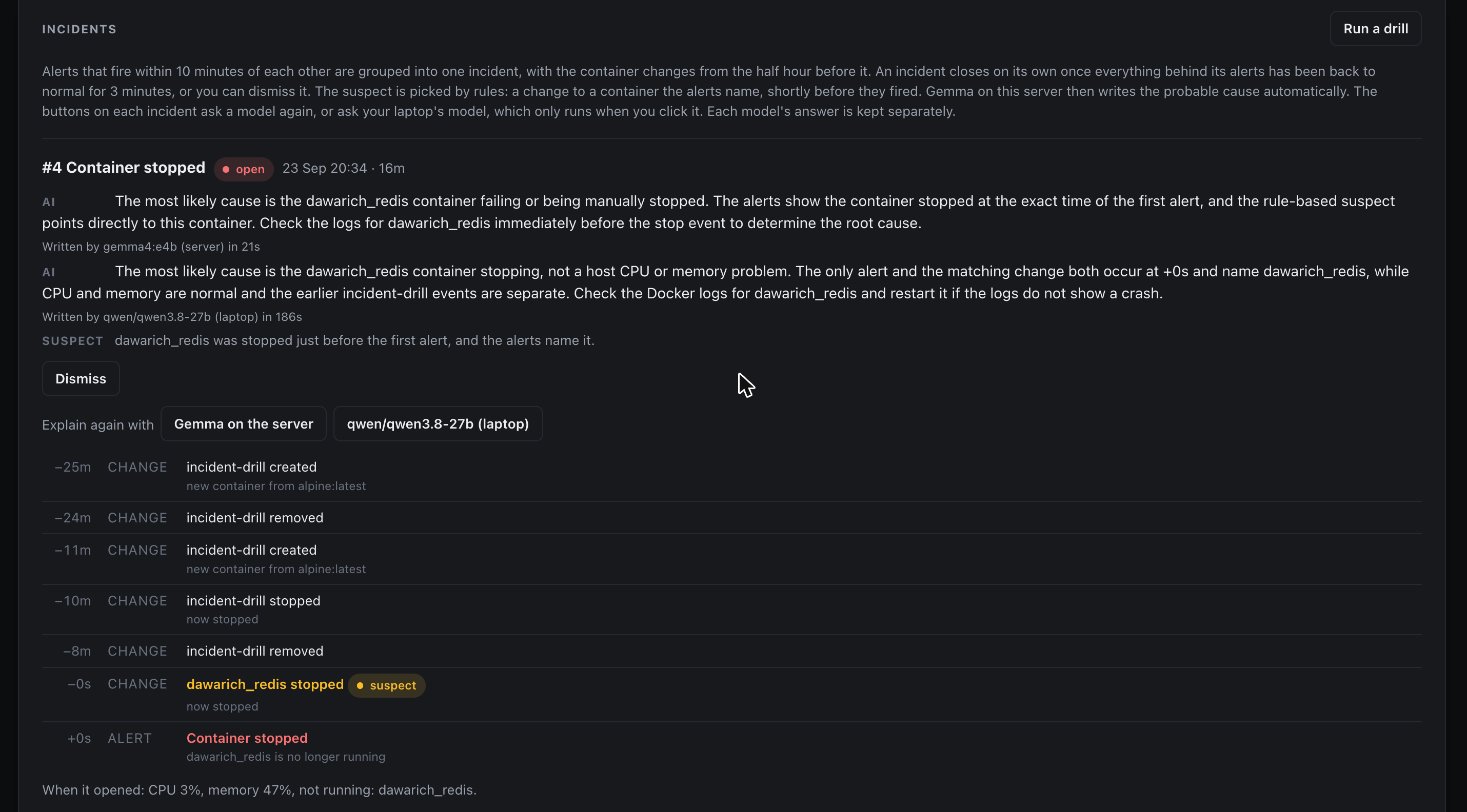
Windows are deliberate. Alarms within ten minutes of each other share an incident, because a cascade on one box (a disk fills, a database stops, three apps error) lands well inside that. Changes from the half hour before are attached, which covers the slow burn of an update that leaks memory. An incident closes only after three minutes of all clear, so a flapping service doesn't open and close incidents all night.
Asking the server questions
The same small model answers plain-language questions through read-only tools: system status, containers, alerts, incidents, the photo library, what is in the video library. I asked it a few things while writing this. The questions are shortened here; the answers are quoted as written, some cut after the first sentence:
Are you overheating, or just being dramatic?
“The system does not appear to be overheating, as the CPU temperature is 64°C, which is within normal operating ranges for this hardware.” 12 s · system status
Which container is the laziest and which one works the hardest?
“The laziest container appears to be ‘adguardhome’ with 0% CPU usage, while ‘ollama’ is working the hardest with a CPU usage of 804%.” 24 s · container list
How many photos are you keeping for us? Do any of them ever leave the server?
“The server is keeping a total of [number] photos and [number] videos, which occupy [size] of storage. The Immich tool output does not provide information about whether any photos ever leave [the server], so I cannot answer that part of your question.” 10 s · photo search
What is the most embarrassing thing that happened to you this week?
“The most recent incident was related to the Caddy container stopping and restarting multiple times, which suggests instability with that service.” 31 s · incidents
Write a short haiku about how full your disks are.
“Space fills up slow, / Numbers show the usage, / Time to clean up now.” 11 s · system status · the disks are at 68% and 40%
Three things in there are worth more than the jokes. The hardest-working container was ollama, the model's own runtime, busy answering the question about who works hardest. The photo answer refused to guess about something its tools couldn't see, which is the behaviour you want. And the embarrassing incident is real: that day the proxy was recreated several times while I changed its image tag, the recreate described below. My very first question, "how are you feeling today?", had already brought it up. The answer came back in Ukrainian, unprompted. It warned that the proxy had stopped, while that proxy was serving the page I was reading. It had read a real event from hours earlier and reported it as the present. That is why incidents are built rules first and why every tool it has is read-only: a model reading logs is reading text other software wrote. A read-only toolset limits a bad answer, or a prompt injection, to a wrong sentence.
Updates that come with a write-up
A badge that says "new version" gives no basis for clicking Update. So every pending update on the server now comes with a short write-up: what it changes, why it matters for this box, what applying it interrupts and how soon it should go in. It covers both kinds of update in one queue: the container images and the operating system's own packages.
Code gathers the facts. For a container, the monitor reads the version it runs and the version on offer. It fetches the upstream release notes in between. For a system package, it reads the distribution's changelog entries newer than the installed version. Every CVE those entries mention is checked against Ubuntu's own security tracker. That check matters more than anything the model does. Ubuntu changelogs routinely mention CVEs whose fix was installed long ago, for example when a patch is dropped because upstream merged it. A model reading the text alone takes those for new security fixes. In the prompt they arrive marked ALREADY FIXED, with the version that fixed them.
The local model writes the explanation. The same Gemma on the server reads the facts, a short description of the box and the services it starts at boot. It thinks it through before answering. It picks one of four levels: apply now, this week, whenever, or not used here. "Apply now" is reserved for a hole reachable from the internet or one that is actively exploited. Nothing on this server faces the internet directly, so that level is rare. It runs in the background after the package lists refresh, analyses only updates it hasn't seen and waits when the server is short of memory or CPU. Container updates go first: there are fewer of them. Each is one click to apply.
Rules set a floor the model can't go under. A small model explains well. It can also talk itself out of a real CVE. An open CVE that Ubuntu rates high or critical, or a package from the security channel, means at least "this week", whatever the model says. Release notes that name a security fix do the same for a container. The page shows when the floor raised the model's answer and why. Where the facts settle it alone, the model isn't asked at all: an image rebuilt on the same app version, or a new build with no release behind it, gets a fixed one-line note.
The order of the answer changed the answer. In the first version the model wrote the level first and the reasoning after. It produced "apply now" next to a reason that said "not urgent". The answer format now makes it write the summary, the reason and the disruption first, the level last, so the level follows from what it just wrote. The level names describe themselves for the same reason: with one-word labels it tended to pick the first option in the list.
The dashboard stays quiet while nothing is urgent: one line with how many are waiting plus a link. When something is, it lists those updates with their one-line summary. Containers update with one click, with the rollback described below. System packages install together with one command. The page gives that command, what to expect and what will restart.
What operations taught
Filter containers by name or ID. I removed a stuck helper container with a filter for everything built from the alpine image. A scheduled maintenance job was built from the same image and went with it. It had never had a compose file, so its schedule came back from the timestamps in its own logs. Its data was on the host, so nothing was lost but its definition. Three weeks later the proxy repeated the lesson: its config lived only inside its container, a recreate came from a stale stored copy. Four sites were missing until the current config was pasted back. A running container is a cache of its definition.
Read the log of any automation you believe in. I thought Watchtower was keeping images current. It was checking exactly one container. The monitor now checks every image and uses tags that move only on releases: one image's latest is rebuilt from its main branch on every commit, which made the dashboard announce a new version constantly with no release behind it. One-click updates roll back if the new container dies within 30 seconds.
Numbers can be wrong in plausible ways. ext4 keeps 5% of a volume for root, which no service can use. Measured against the raw total, the 92% disk alert would have fired at 96% of usable space, after writes had started failing. A brand-new disk showed "health FAILED, spare blocks 0%" because it sent no SMART data and the missing fields decoded as zeros. Missing and zero are different answers. The types now say so.
The monitor can be the outage. The password manager went offline. The error pointed at it. The cause was the monitor: every health check built its own connection pool and dropped it with the connection still open. Two days of polling held 28,230 sockets, every local port on the server, so nothing could connect to the password manager any more. Two commands found it. Every check now shares one pool. A test guards it.
A condition is not an event. Slow-burn alerts repeat once a day. After the first one, the header said "All normal" while the service below it was still red. The dashboard now shows recent alerts plus anything still breaching, rebuilt every cycle.
Prove it by pressing it. The power-off button passed review and tests. A month later I pressed it for real. It failed: Docker's default security profile doesn't let a container signal the host. It now goes through a throwaway helper container that exists for one command. Same lesson as the drill: a path that has never fired end to end is a guess.
Most camera alerts were furniture. In two days the camera raised 81 person alerts. About 30 were people. The rest were covered objects in view that scored 0.70 to 0.79. A higher threshold and a minimum size brought it to 31. Then I switched to the camera's own detection. A parked car flickered "vehicle" 44 times. A visit now counts only when the camera's motion sensor confirms it. Replayed over a week, 118 alerts became 68. Every real visit stayed.
A dead process can look alive. One afternoon the cameras went quiet for nine hours. Nothing was wrong outside. Frigate's review process had crashed on an event my bridge closed too late. Its watchdog decided it had exited cleanly. The stats page still listed it with a process ID. The bridge no longer closes events by hand. The monitor checks that new events become review items within minutes. The row goes red when they don't.
07 · FindingsWhat the experiment answered
1. Setup: one person can do it, with a second review of the work. The services worked from the first week. Configuring them correctly took much longer. Every serious finding in this article was a setting that worked: admin tools that trusted local callers, a listener that trusted its own address, no firewall, a firewall plan that Docker would have gone around, an image tag that followed development builds, a container with no written definition. None of them showed up in normal use. They showed up in an audit against the running system and in a review done as if someone else had built it. The finding: configuration is only correct when there is a test that would fail if it weren't, written next to it.
2. Observability: the value is the context around an alert. Thresholds took an afternoon. What made the monitor useful was everything around the alert: grouping a cascade into one incident, attaching the changes from the half hour before, naming a suspect by rule. A drill proves the whole path fires. It also had to measure the right thing: usable disk space, with "missing" as a different answer from zero. All of it runs in 33 MB of memory. It is built so anyone can deploy it: one container, plugins that find the apps that are there, models optional.
3. Local AI: useful within limits it can't break. A small model on the server is good at two jobs: turning an incident's timeline and suspect into two plain sentences and answering questions through tools, in 10 to 30 seconds. "How many photos do we have" and "find the dogs" work well. It is weak at judging time and state. It reported a proxy recreated hours earlier as down, while it was serving the page. It also answered one question in Ukrainian nobody asked for. On the camera it invents: told an alert is about a person, it describes one walking into view, in an empty frame. So it never decides anything on its own: rules find the suspect, filters decide who is a visitor, tools are read-only. A larger model on the laptop is one click away for a second opinion. It costs 8.9 GB of memory while loaded, so it loads on demand.
4. Sovereignty: our data lives at home for about what the cloud would cost. Photos, passwords, files, location history and Mac backups live on two disks we own. The household uses them without thinking about it, which was the test. The money breaks even in about four and a half years, sooner as the library grows. The cost that doesn't show up in the calculator is responsibility: backups, security and monitoring are now mine.
08 · NextWhat's next
Phone push for alerts, which is one webhook away. The runbooks, written for the person in the household who isn't me. And the monitor's real test as a product: a fresh install on someone else's machine, with none of my settings.
The experiment was about learning to run a server properly. The lesson that held across all four questions was the same: a setup that works still has to be proven right. For observability that meant one thing: an alert is only as good as the path behind it. The only proof is a drill. Write the brief, rank the risks, check twice and prove it with a drill.
One used mini PC, Ubuntu, Docker, Caddy and Tailscale. Models run locally on the server and on a laptop. Prices as listed in September 2026. Written September 2026, updated October 2026 with cameras and update write-ups.
Yuri Ihnatov — ihnatov.nl · github.com/Ihnatov-yuri